# npm 私有仓库
# 为什么要搭建npm私有仓库
- 安全: 把公共组件放到私有npm仓库,只有内网可以访问,这样可以避免敏感代码泄漏
- 下载速度: 使用内部的地址,能够在开发下载 npm 包的同时,将包和其依赖包缓存到 npm 私有仓库服务器中,从而使后续的下载速度更快
# npm私有仓库原理
用户通过 install 向私有 npm 发起请求,fu会先查询所请求的这个模块是否是我们自己的私有模块或已经缓存过的公共模块,如果是则直接返回给用户;如果请求的是一个还没有被缓存的公共模块,那么则会向上游源请求模块并进行缓存后返回给用户。上游的源可以是 npm 官方源,也可以是淘宝镜像源
# 技术选型
- verdaccio (其优点是搭建简单,不需要其他服务)
- cnpm (需要数据库服务,支持 redis 缓存)
# docker 搭建 verdaccio 6
- 下载镜像
docker pull verdaccio/verdaccio
- 创建本地
docker-compose.yml
version: '3.1'

services:
  verdaccio:
    image: verdaccio/verdaccio
    container_name: 'verdaccio'
    networks:
      - node-network
    environment:
      - VERDACCIO_PORT=4873
    ports:
      - '4873:4873'
    volumes:
      - '/www/verdaccio/storage:/verdaccio/storage'
      - '/www/verdaccio/conf:/verdaccio/conf'
      - '/www/verdaccio/plugins:/verdaccio/plugins'
networks:
  node-network:
    driver: bridge
- 添加
config.yaml文件
在映射的/verdaccio/conf路径下 (eg: /www/verdaccio/conf/ )创建 配置文件
cd /www/verdaccio/conf/
vim config.yaml
不添加会报错verdaccio cannot open config file
# config.yaml
storage: ./storage
auth:
  htpasswd:
    file: ./htpasswd
uplinks:
  npmjs:
    url: https://registry.npmjs.org/
packages:
  '@*/*':
    access: $all
    publish: $authenticated
    proxy: npmjs
  '**':
    proxy: npmjs
log: { type: stdout, format: pretty, level: http }
具体配置参考 https://verdaccio.org/docs/next/configuration (opens new window)
- 执行命令
在 docker-compose.yml目录下 执行
docker compose up -d
# 配置 nginx
upstream npmproxy {
    server 127.0.0.1:4873;
}


server {
    listen 80;
    server_name  npm.yourdomain.xyz;
    # return 301 https://$server_name$request_uri;
    location / {
        proxy_set_header   X-Forwarded-For $proxy_add_x_forwarded_for;
        proxy_set_header   Host $host;
        proxy_set_header X-Nginx-Proxy true;
        proxy_set_header   Host $http_host;
        proxy_ssl_session_reuse off;
        proxy_pass         http://npmproxy;
        proxy_redirect off;
    }
}
重启 nginx
nginx -s reload
# 注册账号
打开本地 terminal
nrm add myself http://npm.yourdomain.xyz

nrm use myself

npm login
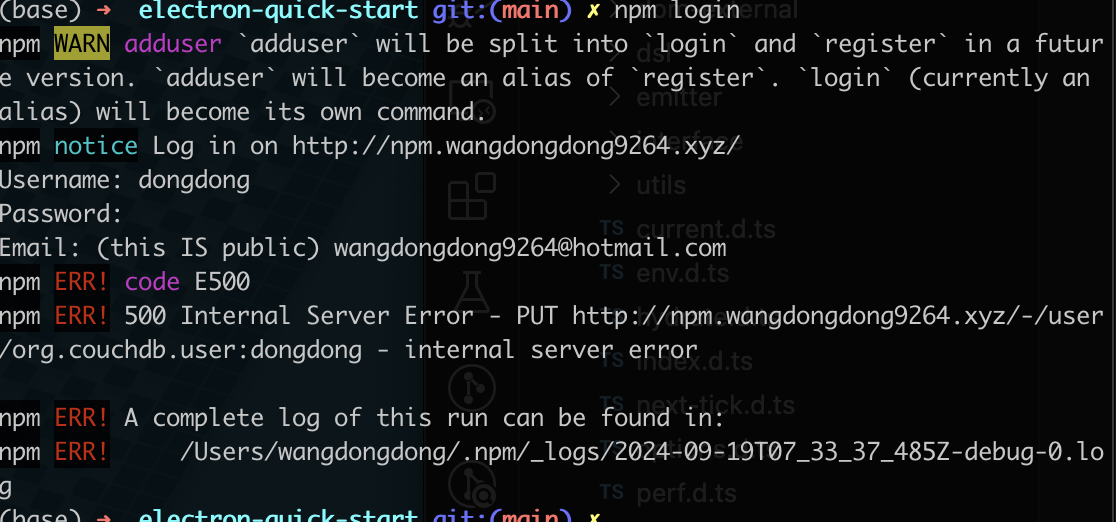
npm login可能会出现下面这个错误
# Linux 文件权限问题
sudo chown -R 10001:65533 /www/verdaccio
# 发布
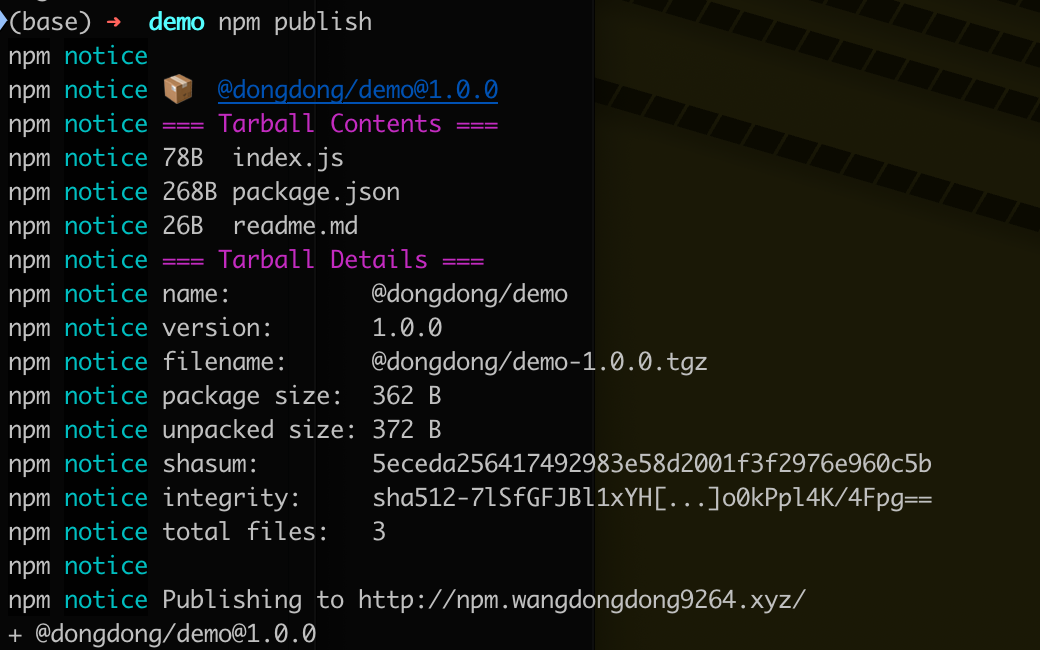
npm publish
# 其它
verdaccio 官网 https://verdaccio.org (opens new window)